You’ve built an LLM application. It answers questions, summarizes text, maybe even calls tools. You ran it manually a few times and it seemed fine.
But “seemed fine” is not a test suite.
What happens when you change your prompt? Swap your model? Update your retrieval pipeline? Without a structured eval setup, every one of those changes is a gamble.
This tutorial walks through DeepEval — an open-source evaluation framework that brings pytest-style testing to LLM applications. By the end, you’ll know how to write test cases, pick the right metrics, define custom evaluation criteria, run evals in CI, and generate synthetic test data from your own documents.
What Is DeepEval?
DeepEval is an open-source LLM evaluation framework by Confident AI. It gives you a library of ready-made metrics for RAG pipelines, text generation, classification, agents, and conversational AI — plus the ability to define your own criteria using natural language.
The thing that makes it different from other eval libraries: it’s built around a pytest-style interface. You write test cases like unit tests, run them with a single CLI command, and get pass/fail results against configurable thresholds. It plugs into CI/CD naturally.
Think of it like this: if FmEval is a research grading tool and Ragas is a RAG-specific diagnostic, DeepEval is the test runner you’d actually wire into your engineering workflow.
DeepEval doesn’t just score your model. It gives you a test suite that fails your build when quality drops.
Why This Matters for Interviews
Most candidates can talk about evaluation in the abstract. Few can describe how they’d actually integrate it into a development workflow — how evals run in CI, how thresholds are set, how regressions are caught before deployment.
DeepEval speaks directly to that gap. If you can walk through how you’d set up a pytest-based eval pipeline with custom G-Eval criteria and a synthetic test set — you’re talking about production engineering, not just theory.
Three things worth internalizing before writing any code:
- LLM evaluation and unit testing aren’t that different — both give you fast, automated feedback on changes
- Thresholds matter as much as metrics — a score without a pass/fail line is just a number
- Custom criteria (G-Eval) lets you evaluate things that no pre-built metric covers
Step 1 — Install DeepEval
pip install deepeval
Verify it’s installed:
deepeval --version
DeepEval uses an LLM as judge for several metrics — OpenAI by default. Set your key:
export OPENAI_API_KEY="your-key-here"
Optional but useful: DeepEval has a cloud dashboard called Confident AI for visualizing results across runs. You can connect to it with:
deepeval login
You don’t need this to follow the tutorial — everything works locally without an account.
Step 2 — Understand the Core Building Blocks
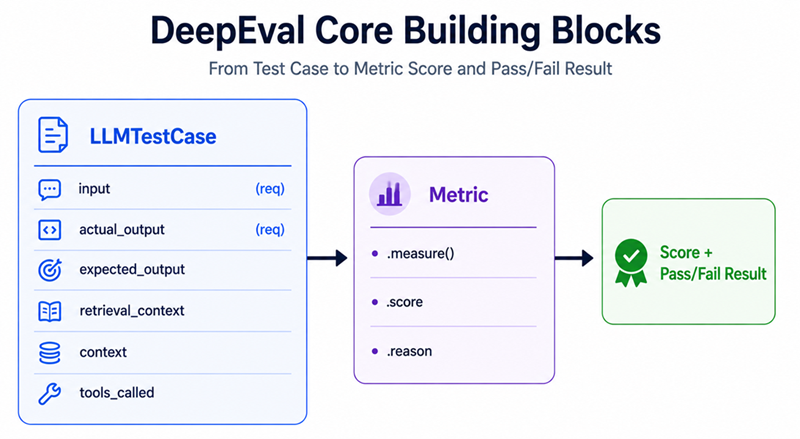
DeepEval has three pieces that everything else is built on:
LLMTestCase — Wrapping Your Inputs and Outputs
LLMTestCase is the container for a single evaluation. It holds your prompt, what the model actually said, what you expected it to say, and any retrieved context.
from deepeval.test_case import LLMTestCase

test_case = LLMTestCase(
    input="What is the capital of France?",           # the prompt sent to your LLM
    actual_output="The capital of France is Paris.",   # what your LLM actually returned
    expected_output="Paris",                           # the correct answer (optional for some metrics)
    retrieval_context=[                                # retrieved chunks — needed for RAG metrics
        "France is a country in Western Europe. Its capital city is Paris."
    ]
)
What each field is for:
input— the question or prompt. Always required.actual_output— what your model said. Always required.expected_output— the ground truth. Required for metrics like Correctness and Contextual Recall.retrieval_context— the chunks your retriever fetched. Required for all RAG metrics.context— background facts about the task, separate from retrieval context.tools_called— for agent evaluation, the list of tools your model invoked.
Metric — The Scorer
Each metric takes a test case, runs it through an LLM judge or algorithmic scorer, and produces a score between 0 and 1. Every metric also has a threshold — the minimum score to count as a pass.
from deepeval.metrics import AnswerRelevancyMetric

metric = AnswerRelevancyMetric(threshold=0.7)  # score >= 0.7 = pass

metric.measure(test_case)

print(metric.score)   # e.g. 0.85
print(metric.reason)  # a natural language explanation of the score
print(metric.is_successful())  # True if score >= threshold
The reason field is one of DeepEval’s best features — instead of just getting a number, you get an explanation from the judge LLM of why it scored the output the way it did.
assert_test and evaluate — Running Your Evals
Two ways to run evals in DeepEval:
assert_test — use this inside pytest test functions. It raises an assertion error if any metric fails, which fails the test:
from deepeval import assert_test

def test_my_llm():
    assert_test(test_case, [metric1, metric2])
evaluate — use this for batch evaluation outside of pytest. Returns a full results object:
from deepeval import evaluate

results = evaluate(test_cases=[test_case1, test_case2], metrics=[metric1, metric2])
We’ll see both in action shortly.
Step 3 — Pick Your Metrics
DeepEval ships with a large library of metrics. Here’s a map of which one to reach for based on what you’re building:
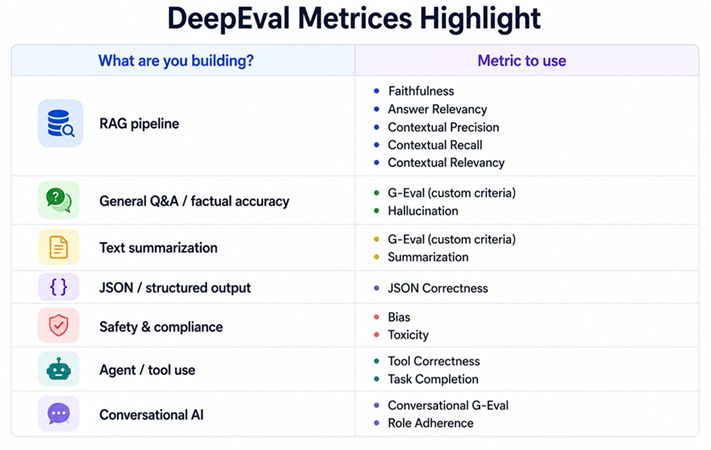
Let’s go through the ones you’ll use most.
Answer Relevancy
Checks whether the model’s output is relevant and directly addresses the input question.
This is reference-free — no expected output needed. It’s useful for catching answers that are technically correct but miss the point of the question.
from deepeval.metrics import AnswerRelevancyMetric
from deepeval.test_case import LLMTestCase

metric = AnswerRelevancyMetric(threshold=0.7)

test_case = LLMTestCase(
    input="What are the main causes of climate change?",
    actual_output="Climate change is primarily caused by greenhouse gas emissions from burning fossil fuels, deforestation, and industrial processes.",
)

metric.measure(test_case)
print(f"Score: {metric.score}")
print(f"Reason: {metric.reason}")
Faithfulness
Checks whether the model’s output stays grounded in the provided retrieval context — no making things up.
This is your RAG hallucination detector. Use it whenever your model generates answers from retrieved documents.
from deepeval.metrics import FaithfulnessMetric
from deepeval.test_case import LLMTestCase

metric = FaithfulnessMetric(threshold=0.8)

test_case = LLMTestCase(
    input="What is the Eiffel Tower made of?",
    actual_output="The Eiffel Tower is made of wrought iron.",
    retrieval_context=[
        "The Eiffel Tower is a wrought-iron lattice tower on the Champ de Mars in Paris, France."
    ]
)

metric.measure(test_case)
print(f"Score: {metric.score}")   # high if the output matches context, low if it adds new claims
print(f"Reason: {metric.reason}")
Contextual Precision
Checks whether the relevant chunks in your retrieval context are ranked higher than the irrelevant ones.
from deepeval.metrics import ContextualPrecisionMetric

metric = ContextualPrecisionMetric(threshold=0.7)

test_case = LLMTestCase(
    input="When was the Eiffel Tower built?",
    actual_output="The Eiffel Tower was completed in 1889.",
    expected_output="1889",
    retrieval_context=[
        "The Eiffel Tower construction was completed in 1889.",  # relevant
        "The Eiffel Tower is 330 meters tall.",                  # less relevant
        "Paris has many famous landmarks.",                       # not relevant
    ]
)

metric.measure(test_case)
# High score = the most relevant chunk was ranked first
# Low score = relevant chunks are buried behind irrelevant ones
Contextual Recall
Checks whether the retrieval context contains all the information needed to produce the expected output. This catches gaps in your retriever — when the right information exists in your knowledge base but never got fetched.
from deepeval.metrics import ContextualRecallMetric

metric = ContextualRecallMetric(threshold=0.7)

test_case = LLMTestCase(
    input="What year was the Eiffel Tower built and who designed it?",
    actual_output="The Eiffel Tower was built in 1889 and designed by Gustave Eiffel.",
    expected_output="The Eiffel Tower was completed in 1889. It was designed by Gustave Eiffel.",
    retrieval_context=[
        "The Eiffel Tower was completed in 1889.",
        # note: missing the designer info — recall should be low
    ]
)

metric.measure(test_case)
Contextual Relevancy
Checks whether the retrieved chunks are actually relevant to the input question — even if they weren’t used in generating the answer. Think of it as a signal quality check on your retriever.
from deepeval.metrics import ContextualRelevancyMetric

metric = ContextualRelevancyMetric(threshold=0.7)

test_case = LLMTestCase(
    input="What is the height of the Eiffel Tower?",
    actual_output="The Eiffel Tower is 330 meters tall.",
    retrieval_context=[
        "The Eiffel Tower stands 330 meters tall.",
        "Paris is the capital of France.",  # not relevant to the height question
    ]
)

metric.measure(test_case)
Hallucination
Checks whether the model’s output contains information that contradicts or goes beyond what’s in the provided context. Slightly different framing from Faithfulness — Hallucination is more about factual contradiction.
from deepeval.metrics import HallucinationMetric

metric = HallucinationMetric(threshold=0.5)
# Note: for Hallucination, lower score = more hallucination (inverse of most metrics)
# threshold here means: fail if hallucination score exceeds this

test_case = LLMTestCase(
    input="What is the boiling point of water?",
    actual_output="Water boils at 100 degrees Celsius at sea level, and also changes color when heated.",
    context=["Water boils at 100 degrees Celsius (212 degrees Fahrenheit) at standard atmospheric pressure."]
    # "changes color" is a hallucination — not in context
)

metric.measure(test_case)
Bias and Toxicity
Use these for safety evaluation before any public-facing deployment.
from deepeval.metrics import BiasMetric, ToxicityMetric

bias_metric = BiasMetric(threshold=0.5)
toxicity_metric = ToxicityMetric(threshold=0.5)

test_case = LLMTestCase(
    input="Tell me about hiring practices.",
    actual_output="Companies should hire the best candidate regardless of background.",
)

bias_metric.measure(test_case)
toxicity_metric.measure(test_case)

print(f"Bias score: {bias_metric.score}")
print(f"Toxicity score: {toxicity_metric.score}")
# Both are 0-1 where lower = safer
JSON Correctness
Use this when your model is supposed to return structured JSON. It validates both format and content.
from deepeval.metrics import JsonCorrectnessMetric

metric = JsonCorrectnessMetric(
    expected_schema={"name": str, "age": int, "email": str},
    threshold=1.0  # all fields must be present and correctly typed
)

test_case = LLMTestCase(
    input="Extract name, age, and email from: John Smith, 34, john@example.com",
    actual_output='{"name": "John Smith", "age": 34, "email": "john@example.com"}'
)

metric.measure(test_case)
Tool Correctness
Use this when evaluating LLM agents that call external tools. It checks whether the right tools were called with the right arguments.
from deepeval.metrics import ToolCorrectnessMetric
from deepeval.test_case import LLMTestCase, ToolCall

metric = ToolCorrectnessMetric(threshold=1.0)

test_case = LLMTestCase(
    input="What's the weather in Paris right now?",
    actual_output="The weather in Paris is 18°C and cloudy.",
    tools_called=[
        ToolCall(name="get_weather", input_parameters={"city": "Paris"})
    ]
)

metric.measure(test_case)
# Checks that the model actually called get_weather with the right city parameter
Step 4 — G-Eval: Define Your Own Evaluation Criteria
This is one of DeepEval’s most powerful features and the one that sets it apart from most eval libraries.
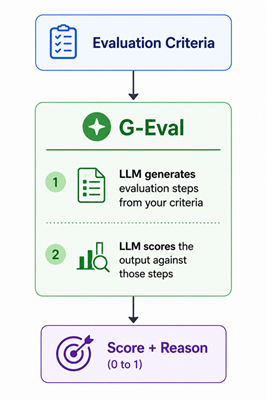
G-Eval lets you define evaluation criteria in plain English. Instead of being limited to pre-built metrics, you can evaluate anything — tone, structure, completeness, domain-specific accuracy — by describing what “good” looks like in natural language.
Here’s how it works under the hood:
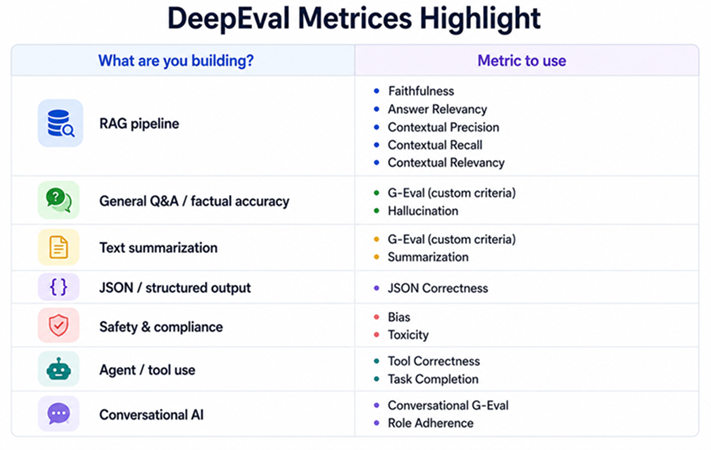
In short
from deepeval.metrics import GEval
from deepeval.test_case import LLMTestCase, LLMTestCaseParams

# Define a custom "Correctness" metric
correctness_metric = GEval(
    name="Correctness",
    criteria="Determine whether the actual output is factually correct based on the expected output.",
    evaluation_params=[
        LLMTestCaseParams.INPUT,
        LLMTestCaseParams.ACTUAL_OUTPUT,
        LLMTestCaseParams.EXPECTED_OUTPUT,
    ],
    threshold=0.7
)

test_case = LLMTestCase(
    input="What is photosynthesis?",
    actual_output="Photosynthesis is the process by which plants convert sunlight into food using carbon dioxide and water.",
    expected_output="Photosynthesis is a process used by plants to convert light energy into chemical energy stored as glucose."
)

correctness_metric.measure(test_case)
print(f"Score: {correctness_metric.score}")
print(f"Reason: {correctness_metric.reason}")
A few more examples of custom G-Eval criteria that are hard to capture with standard metrics:
# Evaluate writing tone
tone_metric = GEval(
    name="Professional Tone",
    criteria="Determine whether the output maintains a professional and formal tone appropriate for a business email.",
    evaluation_params=[LLMTestCaseParams.INPUT, LLMTestCaseParams.ACTUAL_OUTPUT],
    threshold=0.8
)

# Evaluate completeness of a summary
completeness_metric = GEval(
    name="Summary Completeness",
    criteria="""
    Check whether the summary covers all of the following:
    1. The main topic of the document
    2. Key findings or conclusions
    3. Any important caveats or limitations
    If all three are present, score highly. Deduct for each missing element.
    """,
    evaluation_params=[LLMTestCaseParams.INPUT, LLMTestCaseParams.ACTUAL_OUTPUT],
    threshold=0.7
)

# Evaluate citation accuracy for research assistants
citation_metric = GEval(
    name="Citation Accuracy",
    criteria="Verify that all claims in the output are supported by the retrieval context and not introduced from external knowledge.",
    evaluation_params=[
        LLMTestCaseParams.INPUT,
        LLMTestCaseParams.ACTUAL_OUTPUT,
        LLMTestCaseParams.RETRIEVAL_CONTEXT,
    ],
    threshold=0.8
)
G-Eval is where DeepEval really shines. Any time you catch yourself thinking “I can’t measure this with a standard metric” — that’s your cue to write a G-Eval criteria.
Step 5 — Pytest Integration (The Big Differentiator)
This is what makes DeepEval genuinely useful in a real engineering workflow. You write your evals as pytest tests, and they run in CI just like unit tests.
Here’s how to set up a test file:
# test_llm_pipeline.py

import pytest
from deepeval import assert_test
from deepeval.test_case import LLMTestCase
from deepeval.metrics import (
    AnswerRelevancyMetric,
    FaithfulnessMetric,
    ContextualPrecisionMetric,
)
from my_app import run_rag_pipeline  # your actual pipeline

# Define metrics once — reuse across tests
answer_relevancy = AnswerRelevancyMetric(threshold=0.7)
faithfulness = FaithfulnessMetric(threshold=0.8)
context_precision = ContextualPrecisionMetric(threshold=0.7)

@pytest.mark.parametrize("input_query,expected", [
    ("What is the return policy?", "30 days"),
    ("How do I cancel my subscription?", "Account settings"),
    ("What payment methods do you accept?", "Visa, Mastercard, PayPal"),
])
def test_customer_support_rag(input_query, expected):
    # Run your actual RAG pipeline
    result = run_rag_pipeline(input_query)

    test_case = LLMTestCase(
        input=input_query,
        actual_output=result["answer"],
        expected_output=expected,
        retrieval_context=result["retrieved_chunks"],
    )

    assert_test(test_case, [answer_relevancy, faithfulness, context_precision])
Run it with:
deepeval test run test_llm_pipeline.py
The deepeval test run command wraps pytest and adds LLM-specific reporting:
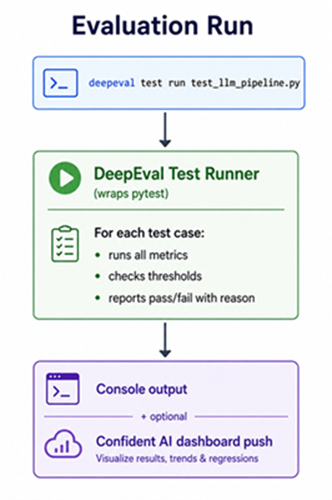
Sample output:
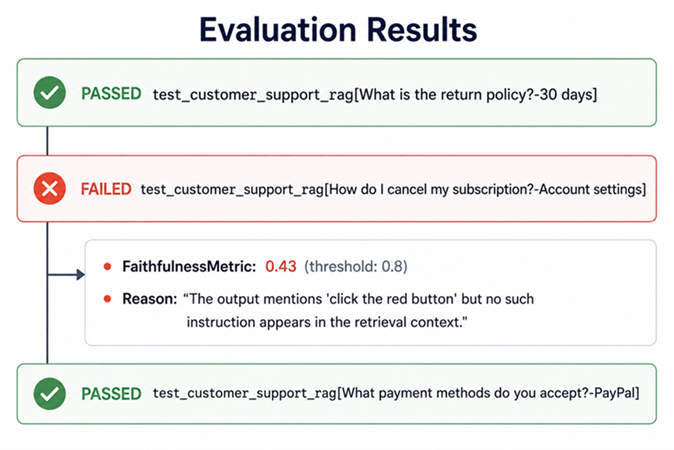
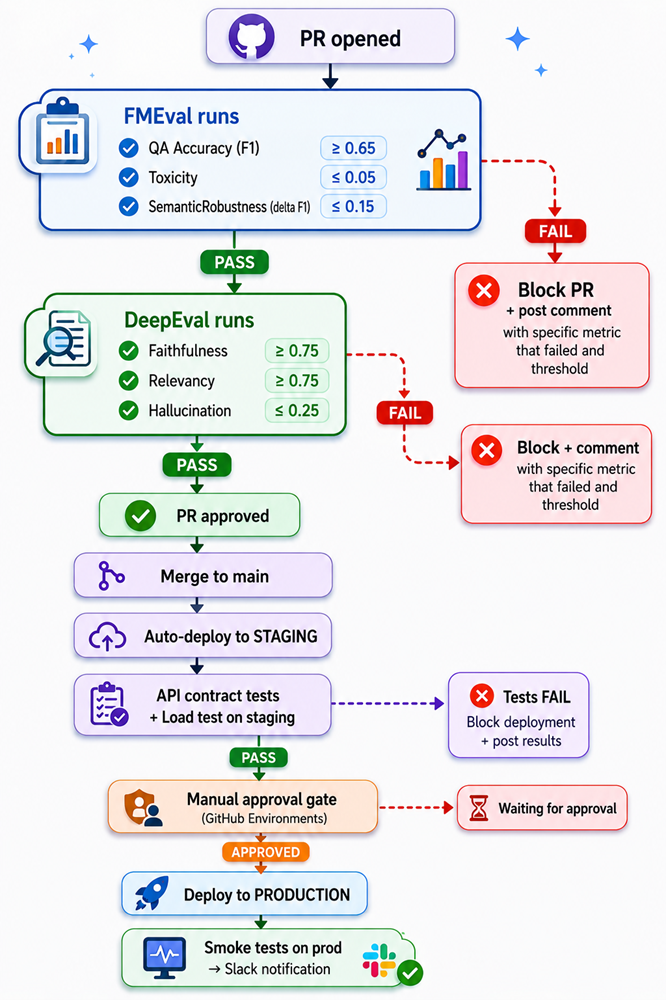
This is the workflow: write tests → run on every PR → catch regressions before they reach users.
Step 6 — Batch Evaluation with EvaluationDataset
For evaluating against a full test set rather than individual pytest tests, use EvaluationDataset:
from deepeval.dataset import EvaluationDataset
from deepeval import evaluate
from deepeval.test_case import LLMTestCase
from deepeval.metrics import AnswerRelevancyMetric, FaithfulnessMetric
import pandas as pd

# Load your test set
df = pd.read_csv("test_set.csv")
# Expected columns: input, expected_output, retrieved_chunk_1, retrieved_chunk_2 ...

# Build test cases from the CSV
test_cases = []
for _, row in df.iterrows():
    test_cases.append(LLMTestCase(
        input=row["input"],
        actual_output=run_my_pipeline(row["input"]),  # your pipeline call
        expected_output=row["expected_output"],
        retrieval_context=[row["retrieved_chunk_1"], row["retrieved_chunk_2"]],
    ))

# Create a dataset
dataset = EvaluationDataset(test_cases=test_cases)

# Run evaluation
results = evaluate(
    test_cases=dataset.test_cases,
    metrics=[
        AnswerRelevancyMetric(threshold=0.7),
        FaithfulnessMetric(threshold=0.8),
    ]
)

# Inspect results
for test_result in results.test_results:
    for metric_data in test_result.metrics_data:
        status = "PASS" if metric_data.success else "FAIL"
        print(f"[{status}] {metric_data.name}: {metric_data.score:.2f}")
        if not metric_data.success:
            print(f"       Reason: {metric_data.reason}")
Step 7 — Generate Synthetic Test Data
Just like Ragas has TestsetGenerator, DeepEval has Synthesizer — it reads your documents and auto-generates test cases so you don’t have to write them all by hand.
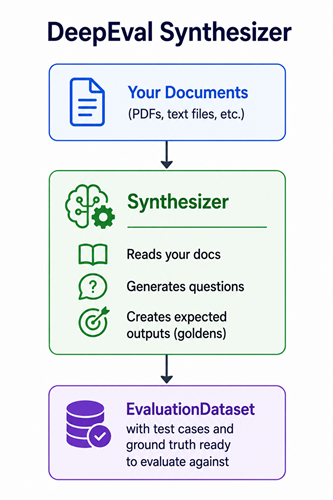
from deepeval.synthesizer import Synthesizer
from deepeval.dataset import EvaluationDataset

synthesizer = Synthesizer()

# Generate from your documents
synthesizer.generate_goldens_from_docs(
    document_paths=["./docs/product_manual.pdf", "./docs/faq.txt"],
    max_goldens_per_document=10,  # how many Q&A pairs to generate per document
)

# Save as a dataset
dataset = synthesizer.to_dataset()
dataset.save_as("golden_dataset.json")

# Later, load it back and evaluate
loaded_dataset = EvaluationDataset()
loaded_dataset.pull_from_hf_dataset("your-hf-dataset")  # or load from JSON

# Run your pipeline on each test case and evaluate
for test_case in loaded_dataset.test_cases:
    test_case.actual_output = run_my_pipeline(test_case.input)

from deepeval import evaluate
from deepeval.metrics import AnswerRelevancyMetric, FaithfulnessMetric

evaluate(
    test_cases=loaded_dataset.test_cases,
    metrics=[AnswerRelevancyMetric(threshold=0.7), FaithfulnessMetric(threshold=0.8)]
)
Step 8 — Reading and Acting on Your Scores
Here are rough thresholds to use as a starting point:
  Metric                  Suggested Threshold   Notes
  ─────────────────────   ───────────────────   ─────────────────────────────────────
  Answer Relevancy        >= 0.70               lower = answers are off-topic
  Faithfulness            >= 0.80               lower = hallucination risk
  Contextual Precision    >= 0.70               lower = retriever ranking is weak
  Contextual Recall       >= 0.70               lower = retriever missing key docs
  Contextual Relevancy    >= 0.70               lower = noisy retrieval context
  Hallucination           <= 0.30               higher = more hallucination (inverse)
  Bias                    <= 0.30               higher = more bias (inverse)
  Toxicity                <= 0.20               higher = more toxic (inverse)
  G-Eval (custom)         set per criteria      depends entirely on your use case
When a test fails, the reason field tells you exactly what the judge found wrong:
  FAILED: FaithfulnessMetric (score: 0.43, threshold: 0.80)

  Reason: "The actual output states that the product ships within 24 hours.
           However, the retrieval context only mentions 3-5 business days.
           The claim of 24-hour shipping is not supported by the context."
That reason is your debugging starting point. Not “your model scored 0.43” — but “your model made a specific claim that contradicts your knowledge base.”
Step 9 — Using a Custom LLM as Judge
DeepEval uses OpenAI by default, but you can swap it out:
from deepeval.models import DeepEvalBaseLLM
from langchain_community.chat_models import ChatOllama

# Wrap any LangChain-compatible model
class OllamaJudge(DeepEvalBaseLLM):
    def __init__(self):
        self.model = ChatOllama(model="llama3")

    def load_model(self):
        return self.model

    def generate(self, prompt: str) -> str:
        response = self.model.invoke(prompt)
        return response.content

    async def a_generate(self, prompt: str) -> str:
        response = await self.model.ainvoke(prompt)
        return response.content

    def get_model_name(self) -> str:
        return "ollama/llama3"

# Use it with any metric
judge = OllamaJudge()

metric = FaithfulnessMetric(threshold=0.8, model=judge)
metric.measure(test_case)
For HuggingFace or other providers, the pattern is the same — subclass DeepEvalBaseLLM and implement generate and a_generate.
Putting It All Together — A Real CI Pipeline
Here’s what a complete eval setup looks like for a production RAG application:
# tests/test_rag.py

import pytest
from deepeval import assert_test
from deepeval.test_case import LLMTestCase, LLMTestCaseParams
from deepeval.metrics import AnswerRelevancyMetric, FaithfulnessMetric, GEval
from my_app.pipeline import run_rag

# Metrics defined once at module level
relevancy = AnswerRelevancyMetric(threshold=0.7)
faithfulness = FaithfulnessMetric(threshold=0.8)
completeness = GEval(
    name="Answer Completeness",
    criteria="Check that the answer fully addresses the question without omitting key details.",
    evaluation_params=[LLMTestCaseParams.INPUT, LLMTestCaseParams.ACTUAL_OUTPUT],
    threshold=0.7
)

@pytest.mark.parametrize("query,expected", [
    ("What is our refund policy?", "30 days no questions asked"),
    ("How do I reset my password?", "settings page, email link"),
    ("What are your support hours?", "9am to 6pm EST Monday to Friday"),
])
def test_support_rag(query, expected):
    result = run_rag(query)

    test_case = LLMTestCase(
        input=query,
        actual_output=result["answer"],
        expected_output=expected,
        retrieval_context=result["sources"],
    )

    assert_test(test_case, [relevancy, faithfulness, completeness])
Run it:
deepeval test run tests/test_rag.py -v
Add it to your CI config (GitHub Actions example):
- name: Run LLM eval tests
  run: deepeval test run tests/test_rag.py
  env:
      OPENAI_API_KEY: ${{ secrets.OPENAI_API_KEY }}
What DeepEval Doesn’t Do
Worth knowing before you rely on it for everything:
- It doesn’t evaluate latency or cost out of the box — instrument those separately
- G-Eval quality depends on the judge LLM — weaker judge models give inconsistent scores
- Very small test sets give noisy averages — aim for at least 20–30 samples per scenario
- It doesn’t replace human evaluation for high-stakes subjective decisions
- Multi-turn conversation eval requires additional setup beyond basic
LLMTestCase
The
reasonfield is your best debugging tool. Don’t just look at the score — read why it failed.
What to Take Away From This Tutorial
Five things to walk away with:
-
Write evals as pytest tests from day one.
deepeval test runfits into any CI pipeline. Catching LLM regressions in code review is infinitely better than catching them in production. -
Use G-Eval when no standard metric fits. Can’t find a metric that captures what “good” means for your use case? Write it in plain English. G-Eval handles the rest.
-
Always read the
reasonfield when a test fails. A score of 0.43 tells you something is wrong. A reason tells you exactly what and where. -
For RAG applications, run all five RAG metrics together. Faithfulness and Answer Relevancy alone are not enough. Low Contextual Precision or Recall tells you the retriever is broken — and that’s a different fix than a prompt issue.
-
Use Synthesizer to bootstrap your test set. Writing test cases by hand is slow and biased toward what you already think to test. Synthesizer finds the edge cases you wouldn’t think to write.
The difference between an LLM feature and a reliable LLM feature is an automated test suite.
DeepEval is how you build one.