You built a RAG pipeline. It retrieves documents, feeds them to an LLM, and produces answers. You ran a few test queries. Things looked fine. So you shipped it.
Two weeks later, users are complaining the answers are wrong. The model was confidently hallucinating details that weren’t in any document — and you had no way to catch it because you had no measurement loop.
This tutorial will fix that. We’re going to walk through Ragas — the evaluation framework built specifically for RAG pipelines — from installation to full evaluation. By the end, you’ll know how to measure retrieval quality, generation quality, and end-to-end accuracy separately, auto-generate a test set from your own documents, and diagnose exactly what’s broken when scores are low.
Let’s get started.
What Is Ragas?
Ragas — short for Retrieval Augmented Generation Assessment — is an open-source evaluation framework built specifically for RAG pipelines. It gives you separate scores for retrieval quality, generation quality, and end-to-end accuracy.
The reason that separation matters is subtle but important: a good-looking final answer can completely hide a broken retrieval step. Your model might be producing fluent, confident answers based on entirely wrong documents — and without Ragas, you’d have no way to know.
Ragas makes the invisible visible. It doesn’t just check the final answer. It checks whether the right documents were retrieved in the first place.
Why This Matters for Interviews
RAG evaluation is one of the most underspecified areas in applied AI right now. Most teams eyeball results or rely on gut feel. If you can name the five core Ragas metrics, explain what each one catches, and walk through how TestsetGenerator works — you signal production experience that most candidates don’t have.
Three things worth knowing going in:
- Retrieval quality and generation quality fail independently — you need separate signals for each
- Some metrics are reference-free, meaning no labeled ground truth needed — critical for production monitoring
- Ragas can auto-generate your test set from your own documents — most engineers don’t know this feature exists
Step 1 — Install Ragas
Let’s start simple:
pip install ragas
For LangChain integration:
pip install ragas langchain langchain-openai langchain-community
For LlamaIndex:
pip install ragas llama-index llama-index-llms-openai
Several Ragas metrics use an LLM to compute scores internally — we’ll cover exactly how that works in the next section. By default, Ragas expects OpenAI:
export OPENAI_API_KEY="your-key-here"
Don’t have OpenAI or want to keep your data local? You can swap in any LLM including Ollama. We’ll walk through that too.
Step 2 — Understand What You’re Evaluating
Before we touch any metrics, let’s get clear on what a RAG pipeline looks like and where Ragas plugs in. This context matters because Ragas measures each stage separately, not just the final output.
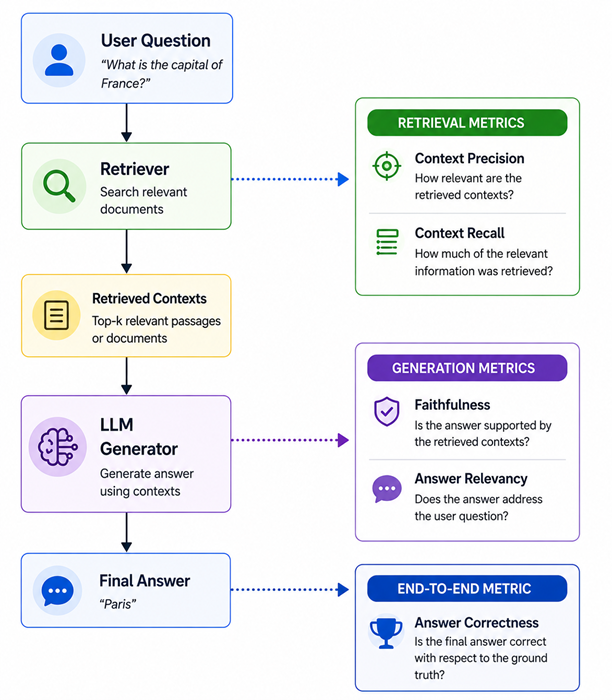
Most eval frameworks only look at the final answer box. Ragas measures every stage — retrieval ranking, retrieval coverage, generation grounding, answer focus, and end-to-end correctness. That’s exactly why it catches problems others miss.
Step 3 — Understand LLM-as-Judge
Before jumping into the metrics themselves, there’s one concept you need to understand: LLM-as-judge.
Several Ragas metrics don’t use string matching or embedding similarity to score outputs. Instead, they use a separate LLM to evaluate quality. Here’s how it works:
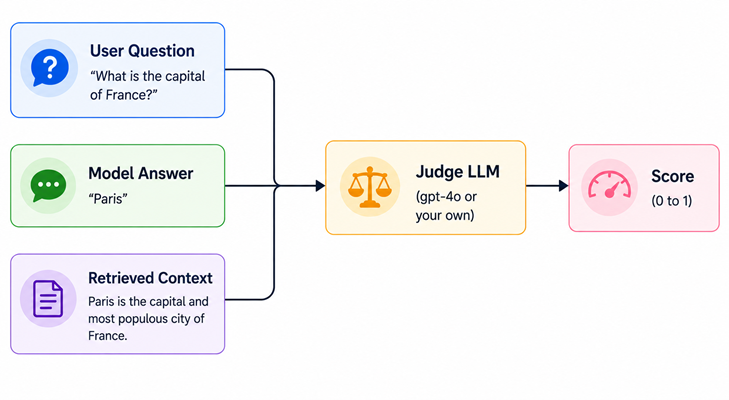
Instead of checking whether two strings look alike, Ragas asks the judge LLM questions like “Does this answer contradict the provided context?” and uses its verdict as the score. Think of it like a teacher grading your essay against your source notes — that teacher is the judge LLM.
This is why you need an API key — Ragas is making real LLM calls for scoring. Evaluating 100 samples with all five metrics can use thousands of tokens. Keep that in mind, especially if you’re wiring this into a CI pipeline.
Step 4 — Learn the Five Core Metrics
Now let’s go through each metric. These are the heart of Ragas and the ones you’ll be reaching for constantly.
Metric 1 — Faithfulness
Faithfulness checks whether every claim in your model’s answer can be traced back to the retrieved documents. This is your hallucination detector.
Think of it like a student writing an essay from a set of notes. Faithfulness checks whether every sentence in that essay appears in the notes. If the student added something from memory that wasn’t in the notes — that’s a faithfulness failure.
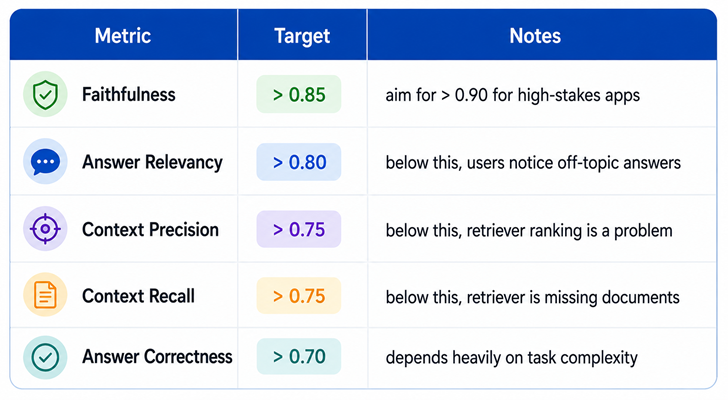
Reference-free: Yes — no ground truth answer needed. Score 0–1. Below 0.7 in production is a red flag.
Metric 2 — Answer Relevancy
Answer Relevancy checks whether the model’s response actually addresses the question that was asked — not just whether it sounds fluent.
Picture this: you asked “What’s the return policy?” and the model gave a well-written paragraph about shipping times. It used the retrieved documents correctly. But it didn’t answer your question. That’s an Answer Relevancy failure.
Under the hood, Ragas generates hypothetical questions from the model’s answer using the judge LLM and measures how similar they are to the original question. Reference-free. Score 0–1.
Metric 3 — Context Precision
Context Precision checks: of all the chunks your retriever fetched, were the most useful ones ranked at the top?
Think of a librarian who finds five books for your research. Context Precision checks whether the most relevant books were handed to you first — or buried at the bottom where the LLM’s attention barely reaches.
This matters because LLMs pay more attention to content at the top of their context window. If your best chunk is ranked last, even a great LLM will underuse it. Requires ground truth. Score 0–1.
Metric 4 — Context Recall
Context Recall checks whether your retriever actually fetched all the documents needed to answer the question correctly.
You need five puzzle pieces to complete the picture. Context Recall checks how many of those five pieces your retriever actually found. It doesn’t matter how capable your generator is if the right documents never made it into the context. Requires ground truth. Score 0–1.
Metric 5 — Answer Correctness
This is the bottom-line metric: is the final answer actually right?
Here’s why it’s different from Faithfulness — Faithfulness checks if the answer matches the retrieved documents. Answer Correctness checks if the answer matches the truth. Those are two different things. Your retriever could have fetched entirely wrong documents, and the model could have faithfully generated a wrong answer from them.
Answer Correctness combines factual overlap (F1-style) with semantic similarity using embeddings. Requires ground truth. Score 0–1.
Quick interview cheat sheet:
- Faithfulness — did the answer stay within the retrieved context? (hallucination check)
- Answer Relevancy — did the answer address the actual question? (topic check)
- Context Precision — were the useful chunks ranked first? (retriever ranking)
- Context Recall — did retrieval find all the needed documents? (retriever coverage)
- Answer Correctness — is the final answer factually right? (end-to-end truth check)
One thing that trips people up — not all metrics need labeled data. Here’s the split:
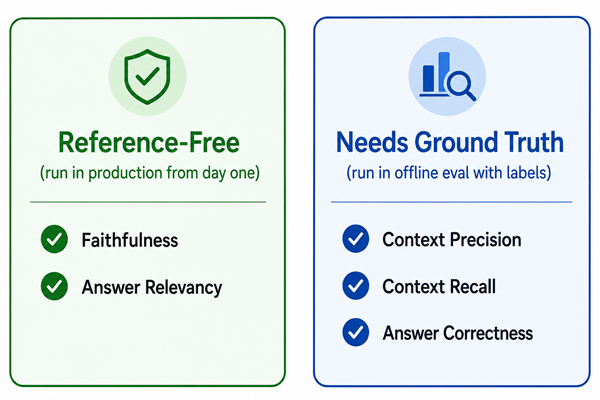
Start with the reference-free pair in production monitoring. Add the rest once you have a labeled test set.
Step 5 — Run Your First Evaluation
Let’s run a quick evaluation to see how everything fits together. In production your data comes from running your actual pipeline — here we’re just showing the expected shape:
from datasets import Dataset
from ragas import evaluate
from ragas.metrics import (
    faithfulness,
    answer_relevancy,
    context_precision,
    context_recall,
    answer_correctness,
)

data = {
    "question": [
        "What is the capital of France?",
        "When was the Eiffel Tower completed?",
    ],
    "answer": [
        # What your RAG pipeline actually returned
        "The capital of France is Paris.",
        "The Eiffel Tower was completed in 1889.",
    ],
    "contexts": [
        # The document chunks your retriever fetched — one list per question
        ["France is a country in Western Europe. Its capital city is Paris."],
        ["The Eiffel Tower is a wrought-iron lattice tower on the Champ de Mars. Construction was completed in 1889."],
    ],
    "ground_truth": [
        # The correct answer — needed for precision, recall, and correctness
        "Paris",
        "1889",
    ],
}

dataset = Dataset.from_dict(data)

result = evaluate(
    dataset=dataset,
    metrics=[faithfulness, answer_relevancy, context_precision, context_recall, answer_correctness]
)

print(result)
# {'faithfulness': 1.0, 'answer_relevancy': 0.96, 'context_precision': 1.0,
#  'context_recall': 1.0, 'answer_correctness': 0.91}
That’s the core Ragas loop. Now let’s add the feature that makes it production-ready.
Step 6 — Generate Your Test Set Automatically
This is the most underused feature in Ragas — and once you know about it, you’ll wonder how you lived without it.
Instead of writing test questions by hand, TestsetGenerator reads your documents and automatically creates a diverse set of Q&A pairs with three question types:
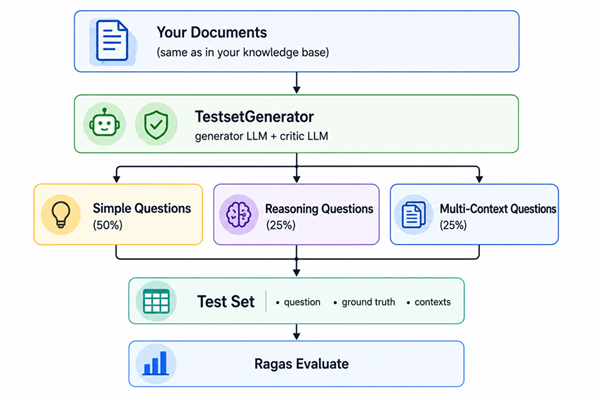
Simple questions are answerable from a single chunk. Reasoning questions require inference. Multi-context questions need information from multiple documents — that last type is the hardest for retrievers and the most important to test.
from ragas.testset import TestsetGenerator
from ragas.testset.evolutions import simple, reasoning, multi_context
from langchain_openai import ChatOpenAI, OpenAIEmbeddings
from langchain_community.document_loaders import DirectoryLoader

# Load the same documents that are in your knowledge base
loader = DirectoryLoader("./docs/", glob="**/*.txt")
documents = loader.load()

generator = TestsetGenerator.from_langchain(
    generator_llm=ChatOpenAI(model="gpt-4o-mini"),  # generates the questions
    critic_llm=ChatOpenAI(model="gpt-4o"),           # stronger model for quality control
    embeddings=OpenAIEmbeddings(),
)

testset = generator.generate_with_langchain_docs(
    documents,
    test_size=50,
    distributions={
        simple: 0.5,         # 50% straightforward factual questions
        reasoning: 0.25,     # 25% inference-based questions
        multi_context: 0.25  # 25% questions that span multiple documents
    }
)

# Export and save — reuse this test set across experiments
testset_df = testset.to_pandas()
# Columns: question | contexts | ground_truth | evolution_type | metadata

testset_df.to_csv("rag_testset.csv", index=False)
Writing 50 good eval questions by hand takes hours and introduces your own blind spots. TestsetGenerator does it in minutes and creates question types you wouldn’t naturally think to write yourself.
Step 7 — Plug Into Your Real Pipeline
Now let’s wire Ragas into an actual LangChain RAG pipeline and evaluate it end-to-end:
from langchain_openai import ChatOpenAI, OpenAIEmbeddings
from langchain_community.vectorstores import FAISS
from langchain.chains import RetrievalQA
from datasets import Dataset
from ragas import evaluate
from ragas.metrics import faithfulness, answer_relevancy, context_recall, answer_correctness
import pandas as pd

# Build your RAG pipeline
llm = ChatOpenAI(model="gpt-4o-mini")
embeddings = OpenAIEmbeddings()
vectorstore = FAISS.load_local("my_vectorstore", embeddings, allow_dangerous_deserialization=True)

qa_chain = RetrievalQA.from_chain_type(
    llm=llm,
    retriever=vectorstore.as_retriever(search_kwargs={"k": 4}),
    return_source_documents=True,  # CRITICAL — must be True to capture retrieved chunks
)

# Load the test set we generated in the previous step
test_df = pd.read_csv("rag_testset.csv")

# Run each question through the pipeline and collect everything Ragas needs
questions, answers, contexts, ground_truths = [], [], [], []

for _, row in test_df.iterrows():
    result = qa_chain.invoke({"query": row["question"]})
    questions.append(row["question"])
    answers.append(result["result"])
    contexts.append([doc.page_content for doc in result["source_documents"]])
    ground_truths.append(row["ground_truth"])

# Evaluate with Ragas
dataset = Dataset.from_dict({
    "question": questions,
    "answer": answers,
    "contexts": contexts,
    "ground_truth": ground_truths,
})

results = evaluate(dataset, metrics=[faithfulness, answer_relevancy, context_recall, answer_correctness])

# Dig into the per-sample results to find what's failing
results_df = results.to_pandas()
print(results_df.describe())

for metric in ["faithfulness", "answer_relevancy", "context_recall", "answer_correctness"]:
    worst = results_df.nsmallest(3, metric)[["question", metric]]
    print(f"\n=== Bottom 3 for {metric} ===")
    print(worst.to_string())
return_source_documents=True is non-negotiable here. Without it you can’t pass the retrieved chunks to Ragas, and without chunks, most metrics simply can’t be computed.
LlamaIndex Integration
If you’re using LlamaIndex instead of LangChain, Ragas has a native integration for it:
from llama_index.core import VectorStoreIndex, SimpleDirectoryReader
from ragas.integrations.llama_index import evaluate as ragas_evaluate_llama
from ragas.metrics import faithfulness, answer_relevancy

# Build your LlamaIndex pipeline
documents = SimpleDirectoryReader("./docs/").load_data()
index = VectorStoreIndex.from_documents(documents)
query_engine = index.as_query_engine(similarity_top_k=3)

# Ragas handles LlamaIndex's output format natively — no manual data prep needed
result = ragas_evaluate_llama(
    query_engine=query_engine,
    metrics=[faithfulness, answer_relevancy],
    questions=["What is X?", "How does Y work?"],
    ground_truths=["X is...", "Y works by..."],  # optional
)

print(result)
Using Local Models — No OpenAI Required
If you don’t want to pay for OpenAI evaluations, or if your data can’t leave your infrastructure, you can swap in a local model.
Option A — Ollama (easiest to set up):
ollama serve
ollama pull llama3
ollama pull nomic-embed-text
from langchain_community.chat_models import ChatOllama
from langchain_community.embeddings import OllamaEmbeddings
from ragas.llms import LangchainLLMWrapper
from ragas.embeddings import LangchainEmbeddingsWrapper
from ragas.metrics import faithfulness, answer_relevancy

local_llm = LangchainLLMWrapper(ChatOllama(model="llama3"))
local_embeddings = LangchainEmbeddingsWrapper(OllamaEmbeddings(model="nomic-embed-text"))

# Assign to each metric that needs them
faithfulness.llm = local_llm
answer_relevancy.llm = local_llm
answer_relevancy.embeddings = local_embeddings  # this metric also needs embeddings

# Now evaluate as normal — completely local, no OpenAI
result = evaluate(dataset=dataset, metrics=[faithfulness, answer_relevancy])
Option B — HuggingFace models:
from langchain_huggingface import HuggingFacePipeline, HuggingFaceEmbeddings
from ragas.llms import LangchainLLMWrapper
from ragas.embeddings import LangchainEmbeddingsWrapper
from transformers import pipeline

hf_pipeline = pipeline("text-generation", model="mistralai/Mistral-7B-Instruct-v0.2")
local_llm = LangchainLLMWrapper(HuggingFacePipeline(pipeline=hf_pipeline))
local_embeddings = LangchainEmbeddingsWrapper(
    HuggingFaceEmbeddings(model_name="sentence-transformers/all-MiniLM-L6-v2")
)

faithfulness.llm = local_llm
answer_relevancy.llm = local_llm
answer_relevancy.embeddings = local_embeddings
One thing to note: local eval quality depends on model capability. Llama 3 70B or Mistral 7B Instruct work reasonably well as judges. Very small models produce inconsistent verdicts — don’t use a sub-3B model as your evaluator.
RunConfig — Surviving Large Eval Runs
When you’re evaluating 50–100 samples, individual LLM calls will occasionally time out or hit rate limits. Without RunConfig, a crash at sample 47 means starting over from scratch.
from ragas import evaluate
from ragas.run_config import RunConfig

result = evaluate(
    dataset=dataset,
    metrics=[faithfulness, answer_relevancy, context_recall],
    run_config=RunConfig(
        max_workers=4,   # parallel requests — lower this if you're hitting rate limits
        max_retries=5,   # retry failed calls before giving up on a sample
        timeout=60,      # seconds before a single LLM call is considered failed
        max_wait=30,     # max seconds to wait between retries
    )
)
If you’re on OpenAI’s free tier or hitting 429 errors, set max_workers=1. Slower, but it won’t crash.
Step 8 — Read Your Scores and Know What to Fix
Here are rough production benchmarks to guide you:
Here’s a common failure pattern that looks fine at a glance but has a very specific root cause:
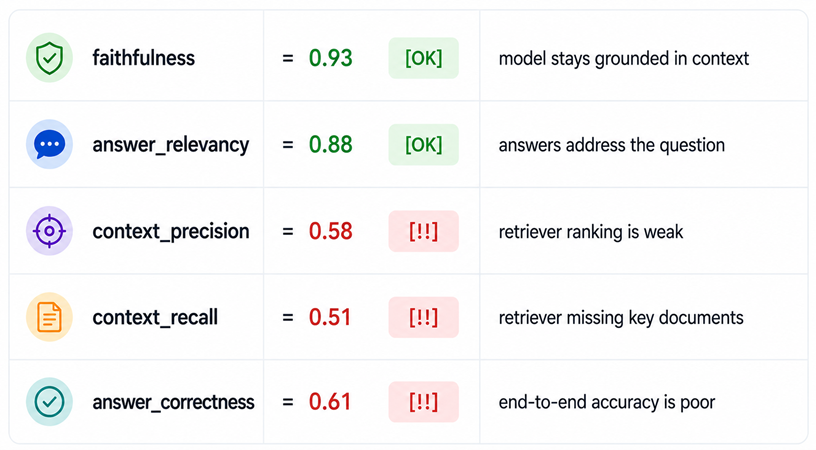
This tells you the problem is the retriever — not the LLM. Tuning your prompt here would be completely wasted effort.
Use this diagnostic tree to figure out what to fix:
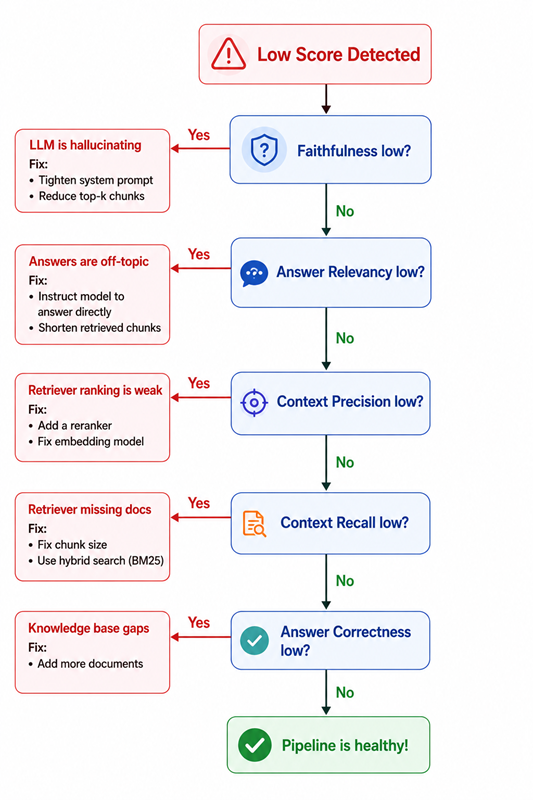
The most common mistake: reaching for prompt engineering when the real problem is retrieval. If Context Precision or Recall is low, no amount of prompt tweaking will save you.
What Ragas Can’t Do
Before you go, it’s worth knowing Ragas’ limits so you don’t rely on it for the wrong things:
- Latency and cost — instrument this separately in your pipeline
- Multi-turn conversations — Ragas is built for single-turn Q&A
- Errors that fool the judge LLM — a stronger judge helps, but no evaluator is perfect
- Detecting when your entire knowledge base is outdated or wrong
For production monitoring without ground truth labels: start with Faithfulness + Answer Relevancy. Both are reference-free — you get real signal from day one.
What to Take Away From This Tutorial
Four things to walk away with:
-
Evaluate retrieval and generation separately. A fluent, on-topic answer can completely hide a broken retriever. Use Context Precision and Recall to measure the retrieval stage independently.
-
Use TestsetGenerator before building test questions by hand. It generates diverse question types from your own documents — including multi-context questions most people never think to write — and creates the ground truth automatically.
-
Start with Faithfulness and Answer Relevancy in production monitoring. Both are reference-free. You get real signal without a single labeled sample.
-
When Context Precision or Recall is low, fix the retriever — not the prompt. This is the most common misdiagnosis in RAG debugging, and Ragas gives you the data to make the right call.
The difference between a RAG demo and a RAG product is a measurement loop.
Ragas is that loop. Build it before you ship — not after someone files a bug.